6 Best Alternatives to the Swinora Golf Launch Monitor 13 (2026)
As an Amazon Associate we earn from qualifying purchases. Links on this page are affiliate links.
The Swinora Golf Launch Monitor 13 Metrics tracks thirteen data points, including ball speed and spin rate, using built-in environmental sensors for real-time adjustments. Its OLED display provides instant feedback, and the metal body offers durability for both indoor and outdoor use. If you are looking for swinora golf launch monitor alternatives, you might want a different size, feature set, or brand that better fits your specific training environment or budget.
We selected these alternatives because their specifications overlap with the original device in key areas like portability and data tracking. Some options focus on compact dimensions for easy storage, while others prioritize integration with simulator software or offer distinct sensor technologies. This list covers devices that provide similar insights into your swing, allowing you to compare specs like weight, dimensions, and connectivity to find the best fit for your game.
How alternatives compare to Swinora
PHIGOLF Motion Sensor Golf Stick
The PHIGOLF Motion Sensor Golf Stick replaces radar with a smart club sensor. You hold the stick during your swing, and the AI analyzes your motion via your smartphone. This approach requires no specific space setup, unlike the Swinora which needs 15 feet of clearance. It measures swing mechanics rather than ball flight metrics like spin rate or launch angle. You get immediate feedback on your swing path and tempo. This option suits players who want to refine their technique indoors without worrying about ball flight data. It lacks the comprehensive 13-metric dashboard but offers a simpler, device-free practice routine focused on swing feel and consistency.
Izzo Swami Launch Master Golf Launch Simulator
The Izzo Swami Launch Master is a lightweight Doppler radar unit that prioritizes portability and simplicity. It provides essential ball speed and distance data with audible feedback, but it does not track the 13 detailed metrics found in the Swinora. You miss out on spin rate, attack angle, and environmental adjustments. However, it is significantly smaller and lighter, weighing just one pound. This makes it easier to carry to the range or fit into a golf bag. It lacks the OLED display and smart app integration of the Swinora. This choice is best for golfers who want basic, reliable data without the complexity of advanced analytics or the need for a dedicated app ecosystem.
Garmin Approach R10 Portable Launch Monitor
The Garmin Approach R10 is a compact radar monitor that relies entirely on its smartphone app for data visualization. It tracks 13 metrics similar to the Swinora, including ball speed, launch angle, and spin rate. However, it does not feature a built-in OLED display or environmental sensors for real-time condition adjustments. You must use your phone to view results and video analysis. It is waterproof and designed for durability on the range. The Swinora offers a standalone display and physical alerts, while the R10 integrates deeper video tracking. This option fits players who prefer a minimalist hardware design and want advanced video swing analysis paired with their launch data.
Voice Caddie SC4 Pro Launch Monitor
The Voice Caddie SC4 Pro focuses on professional-grade accuracy using its Prometrics Engine. It provides detailed swing and ball data but relies on third-party apps like E6 Connect for the full experience. It does not include a built-in display or environmental sensors like the Swinora. You gain access to 3D simulator integration and highly precise metrics, which is ideal for serious training. The Swinora offers a more self-contained experience with its OLED screen and smart alerts. The SC4 Pro is lighter and more portable. This choice suits golfers who already use simulator software and prioritize raw data accuracy over standalone hardware features and immediate visual feedback.
TheStack Radar Portable Launch Monitor
TheStack Radar is a minimalistic device designed specifically for iOS users who want to track swing speed and wedge distances. It does not provide the full 13-metric suite or environmental adjustments found in the Swinora. You get focused data on speed and distance with gamified apps. It is extremely lightweight at just 4.16 ounces. The Swinora offers a broader range of analytics including spin rate and launch angle. TheStack Radar lacks a display and relies on your phone. This option is best for players who primarily want to improve swing speed and wedge control without needing comprehensive ball flight data or complex simulator features.
Garmin Approach R50 Premium Launch Monitor
The Garmin Approach R50 is a premium simulator system with a large touchscreen and advanced camera system. It offers an all-in-one experience that goes beyond simple launch data. You get a robust display and detailed swing analysis without needing a smartphone. However, it is much larger and heavier than the portable Swinora. It does not use radar for ball flight but rather camera-based tracking. The Swinora is designed for portability and quick setup. The R50 is built for dedicated home practice sessions. This choice fits golfers who want a high-end, stationary simulator setup with a large visual interface and do not need the mobility of a radar-based launch monitor.
Quick picks
Our 7 picks

Swinora Golf Launch Monitor 13 Metrics
Best for: Golfers seeking detailed metrics without subscriptions
- Measurement Technology
- Radar
- Display Type
- OLED display
- Color
- Black
View on Amazon: Swinora Golf Launch Monitor 13 Metrics Affiliate link
The Swinora Golf Launch Monitor tracks 13 ball data points including ball speed, club speed, and spin rate. It features a durable metal body with an OLED display and built-in environmental sensors for temperature, humidity, and barometric pressure. The device requires 15 feet of total space for indoor use. It offers a one-time app download with no annual fees, providing a practical solution for golfers seeking detailed swing insights without recurring costs.
Pros
- Tracks 13 ball data points including attack angle and launch angle
- Includes built-in environmental sensors for temperature, humidity, and pressure
- Features a durable metal body and OLED display
- No annual fees with lifetime app access
- Offers distance calibration from 80% to 120% for specific clubs
Cons
- Indoor use requires at least 15 feet of total space
- Does not measure horizontal club face angle or swing path
- Bluetooth connection works best when the phone is placed in front of the device
Good fit if
- You want detailed swing metrics without subscription fees
- You have sufficient space for accurate radar tracking
- You need environmental adjustments for outdoor practice
Skip if
- You need to measure swing path or face angle
- You have less than 15 feet of indoor space
- You prefer a compact device for tight areas
Verdict: Swinora Golf Launch Monitor with 13 Metrics provides comprehensive data tracking for golfers who prioritize detailed metrics and have the space to use it effectively.

PHIGOLF Motion Sensor Golf Stick
Best for: indoor swing practice with a phone
- Measurement Technology
- 9-axis motion sensor
- Simulator Compatibility
- Phigolf, E6 Connect
- Color
- Black
- Launch Monitor Type
- Golf Simulator
- Use Location
- Indoor, Outdoor, Home
- Dimensions
- 3 × 5 × 25 inches
View on Amazon: PHIGOLF Motion Sensor Golf Stick Affiliate link
This is a home golf simulator using a 9-axis motion sensor and a dedicated swing stick. It connects to iOS or Android devices via the Phigolf app and supports E6 Connect. The system tracks swing movement and provides AI coaching with visual annotations. It allows play on over 38,000 courses. It suits golfers wanting indoor practice without complex launch monitor hardware.
Pros
- 9-axis motion sensor for swing tracking
- AI swing coach with pose tracking
- Compatible with E6 Connect simulator
- Access to 38,000+ virtual courses
- Works with real clubs or swing stick
Cons
- Requires a smartphone or tablet
- No dedicated display or hardware screen
- Limited to motion data, not radar
Good fit if
- You want affordable indoor practice
- You already own a compatible phone
- You prefer swing stick training
Skip if
- You need real ball flight data
- You want a standalone device
- You dislike using mobile apps
Verdict: PHIGOLF Motion Sensor Golf Stick is a smart choice for players who already have a smartphone and want to practice swings indoors using a dedicated stick and AI feedback.

Izzo Swami Launch Master Golf Launch Simulator
Best for: basic portable launch data and audible feedback
- Measurement Technology
- Doppler radar technology
- Club Data Points
- club head speed
- Display Type
- LCD display
- Size
- Regular Size
- Color
- Black
- Launch Monitor Type
- Golf Simulator
View on Amazon: Izzo Swami Launch Master Golf Launch Simulator Affiliate link
The Izzo Swami Launch Master uses Doppler radar to measure club head speed, ball speed, smash factor, and carry distance. It features an LCD display for instant feedback and an audible read-out option. Weighing 1 pound and measuring 9.37 by 7.72 by 1.81 inches, it is compact enough for a golf bag. It includes 4 AA batteries and a hard case. This unit suits players seeking portable, basic launch data.
Pros
- Doppler radar technology for accurate baseline measurements
- LCD display provides instant shot feedback
- Audible read-out calls out distance after each shot
- Compact dimensions allow easy storage in a golf bag
- Allows manual entry of club lofts for personalized results
Cons
- Only measures club head speed as the specific club data point
- Requires 4 AA batteries for operation
- Lacks Bluetooth connectivity or smartphone app integration
Good fit if
- You want a portable device for range or net practice
- You prefer audible feedback over visual-only data
- You need basic stats like ball speed and carry distance
Skip if
- You require detailed spin rate or launch angle metrics
- You prefer wireless data transfer to a mobile app
- You want a rechargeable battery system instead of AA cells
Verdict: Izzo Swami Launch Master Golf Launch Simulator delivers essential Doppler radar stats in a lightweight, portable package. It fits golfers who want simple, audible feedback for practice sessions without needing complex simulator software.
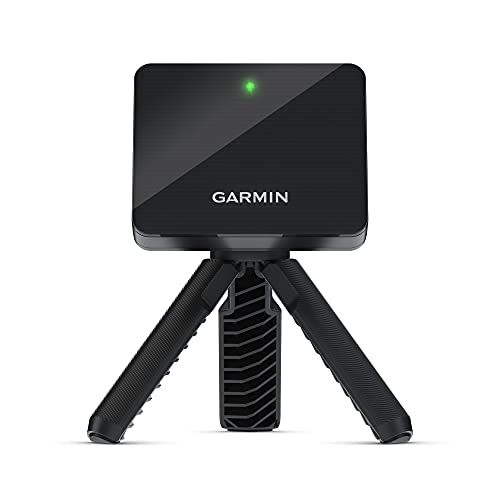
Garmin Approach R10 Portable Launch Monitor
Best for: App-based swing analysis and range practice
- Club Data Points
- club head speed, swing tempo
- Battery Life
- up to 10 hours
- Waterproof Rating
- IPX7
- Color
- Black
- Launch Monitor Type
- Portable Launch Monitor
- Use Location
- Driving Range, Home
View on Amazon: Garmin Approach R10 Portable Launch Monitor Affiliate link
The Garmin Approach R10 is a portable launch monitor designed for home and range use. It tracks club head speed, ball speed, and launch angle with high precision. The device pairs with the Garmin Golf app for video analysis and training modes. It features IPX7 waterproofing and up to 10 hours of battery life. This unit suits players seeking accurate data integration with mobile apps.
Pros
- IPX7 waterproof rating for outdoor durability
- Up to 10 hours of battery life
- Tracks club head speed and swing tempo
- Includes phone mount for bag attachment
- Launch angle accuracy of plus/minus 1 degree
Cons
- Requires a compatible smartphone and app for full functionality
- No built-in display for standalone metrics
- Virtual course access requires an active subscription
Good fit if
- You want accurate ball speed and launch angle data
- You prefer analyzing swings via video clips in an app
- You need a waterproof device for range use
Skip if
- You need a standalone unit without a phone
- You want to play virtual rounds without a subscription
- You prefer a device with a built-in screen
Verdict: The Garmin Approach R10 Portable Launch Monitor fits players who rely on smartphone apps for detailed swing analysis and video tracking. It is ideal for those who value waterproof durability and long battery life over standalone hardware features.

Voice Caddie SC4 Pro Launch Monitor
Best for: players wanting app-based 3D simulator integration
- Display Type
- Built-in Screen
- Simulator Compatibility
- E6 Connect
- Speed Training
- Speed Training/Swing Speed Mode
- Color
- Black
- Launch Monitor Type
- Golf Simulator
- Use Location
- Driving Range, Indoor, Outdoor, Home
View on Amazon: Voice Caddie SC4 Pro Launch Monitor Affiliate link
The Voice Caddie SC4 Pro uses a Prometrics Engine to track club head data and ball flight with real-time accuracy. It connects to the VOICECADDIE S app and E6 Connect for 3D simulation. Weighing 1.3 pounds, it is portable for indoor or outdoor use. You get access to multiple training modes and do not need special balls. This setup suits golfers who want detailed swing analysis and immersive practice environments.
Pros
- Prometrics Engine provides precise ball and club head data.
- Includes E6 Connect and 3D Driving Range simulator access.
- Connects to VOICECADDIE S app for statistical analysis.
- Supports Speed Training and Practice/Target modes.
- Works with standard golf balls indoors and outdoors.
Cons
- Requires smartphone app for full feature access.
- No dedicated physical display on the unit.
- Relies on software integration for advanced metrics.
Good fit if
- You want precise club head and ball flight data.
- You plan to use a 3D simulator like E6 Connect.
- You prefer portable equipment for home and range use.
Skip if
- You need a device with a built-in screen.
- You want to avoid using a mobile app.
- You only want basic ball speed without club data.
Verdict: The Voice Caddie SC4 Pro Golf Launch Monitor delivers pro-grade accuracy via its Prometrics Engine and integrates seamlessly with E6 Connect. It fits players who value detailed swing metrics and virtual range practice over standalone hardware displays.
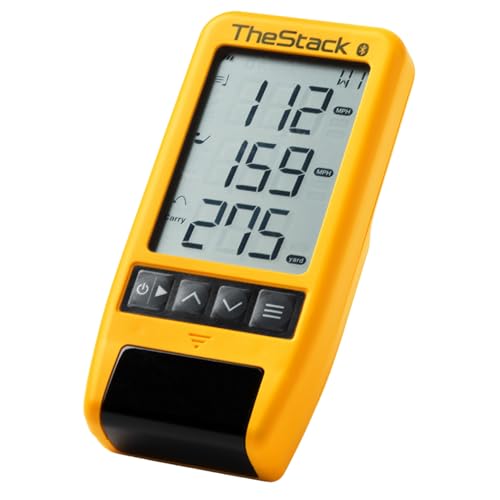
TheStack Radar Portable Launch Monitor
Best for: iOS users focused on speed and wedge training
- Club Data Points
- swing speed
- Speed Training
- TheStack, Stack Wedging, Stack Putting
- Launch Monitor Type
- Portable Launch Monitor
- Weight
- 4.16 ounces
View on Amazon: TheStack Radar Portable Launch Monitor Affiliate link
The Stack Radar is a portable launch monitor weighing 4.16 ounces. It measures swing speed and ball speed to calculate carry distance and smash factor. It connects via Bluetooth to the iOS and Android app. It includes gamified wedge training and putting practice on iOS. This device suits players focused on speed training and short-game improvement.
Pros
- Measures swing speed and ball speed
- Calculates estimated carry distance and smash factor
- Connects via Bluetooth to TheStack App
- Includes Stack Wedging and Stack Putting apps
Cons
- Wedge training is iOS only
- Limited to speed and ball data points
- Requires iOS 15.0 or later for full features
Good fit if
- You want to track swing and ball speed
- You practice wedging and putting on an iPhone
- You need a lightweight device for range use
Skip if
- You use an Android device for wedge training
- You need detailed club path data
- You want a standalone display unit
Verdict: TheStack System Stack Radar delivers precise speed metrics and gamified practice apps for iOS users. It is a practical tool for players prioritizing swing speed and wedge distance control over comprehensive ball flight data.

Garmin Approach R50 Premium Launch Monitor
Best for: Golfers wanting a dedicated simulator with a large display
- Measurement Technology
- 3-camera system
- Club Data Points
- face to path
- Display Type
- 10" built-in color touchscreen
- Battery Life
- up to 4 hours
- Simulator Compatibility
- Home Tee Hero
- Color
- Black
View on Amazon: Garmin Approach R50 Premium Launch Monitor Affiliate link
The Garmin Approach R50 is a premium launch monitor featuring a 10-inch built-in color touchscreen and a 3-camera system for precision metrics. It measures ball speed, launch angle, and spin rate, with face-to-path data available via a tracking sticker. The unit includes a barometer for accurate carry distances and supports HDMI output for larger displays. It suits golfers seeking detailed swing analysis and virtual play on over 43,000 courses through a subscription service.
Pros
- 10-inch built-in color touchscreen display
- 3-camera system for precision metrics
- Built-in barometer for atmospheric pressure adjustments
- HDMI output for projector connection
- Tracks face to path with required sticker
Cons
- Requires active Garmin Golf membership for simulator features
- Heavier at 9 pounds compared to portable sensors
- Subscription required for Home Tee Hero access
Good fit if
- You want a dedicated display for immediate feedback
- You need precise ball flight trajectory modeling
- You prefer connecting to a projector for larger viewing
Skip if
- You need a lightweight, ultra-portable unit
- You want to avoid monthly subscription fees
- You only need basic ball speed and distance data
Verdict: The Garmin Approach R50 Golf Simulator offers a robust, all-in-one experience with its large touchscreen and advanced camera system, making it ideal for serious practice sessions at home.
Specifications side by side
| Spec | Swinora Golf Launch Monitor 13 Metrics | PHIGOLF Motion Sensor Golf Stick | Izzo Swami Launch Master Golf Launch Simulator | Garmin Approach R10 Portable Launch Monitor | Voice Caddie SC4 Pro Launch Monitor | TheStack Radar Portable Launch Monitor | Garmin Approach R50 Premium Launch Monitor |
|---|---|---|---|---|---|---|---|
| Measurement Technology | Radar | 9-axis motion sensor | Doppler radar technology | not stated | not stated | not stated | 3-camera system |
| Club Data Points | not stated | not stated | club head speed | club head speed, swing tempo | not stated | swing speed | face to path |
| Display Type | OLED display | not stated | LCD display | not stated | Built-in Screen | not stated | 10" built-in color touchscreen |
| Battery Life | not stated | not stated | not stated | up to 10 hours | not stated | not stated | up to 4 hours |
| Simulator Compatibility | not stated | Phigolf, E6 Connect | not stated | not stated | E6 Connect | not stated | Home Tee Hero |
| Speed Training | not stated | not stated | not stated | not stated | Speed Training/Swing Speed Mode | TheStack, Stack Wedging, Stack Putting | not stated |
| Waterproof Rating | not stated | not stated | not stated | IPX7 | not stated | not stated | not stated |
| Size | not stated | 27.6" | Regular Size | (14' x 20' x 10') | not stated | not stated | 10 inches |
| Color | Black | Black | Black | Black | Black | not stated | Black |
| Launch Monitor Type | not stated | Golf Simulator | Golf Simulator | Portable Launch Monitor | Golf Simulator | Portable Launch Monitor | Golf Simulator |
| Use Location | not stated | Indoor, Outdoor, Home | not stated | Driving Range, Home | Driving Range, Indoor, Outdoor, Home | not stated | Driving Range |
| Dimensions | not stated | 3 × 5 × 25 inches | 9.37 × 7.72 × 1.81 inches | 3.5 × 2.8 × 1 inches | 1.92 × 7.59 × 1.14 inches | not stated | 10.6 × 7.5 × 16.5 inches |
| Weight | not stated | 1.3 pounds | 1 pounds | 12 ounces | 1.3 pounds | 4.16 ounces | 9 pounds |
| Model | not stated | Phigolf2 Flex | 689769998423 | 010-02356-00 | SC4 Pro (+ 3D Driving Range Simulator) | Stack Radar | 010-02542-00 |
If you need specific room dimensions, you can compare published specs for the best golf launch monitors for home.
Frequently asked questions
Which launch monitor is best for indoor practice without a simulator?
The PHIGOLF Motion Sensor Golf Stick is designed specifically for indoor swing practice using a smartphone. It attaches to a club, allowing you to analyze your motion via AI feedback. This setup requires no radar space, making it ideal for home use where the Swinora might not fit.
What is the most portable launch monitor option?
The Stack Radar is the lightest option, weighing only 4.16 ounces. It focuses on precise speed metrics and wedge training for iOS users. Its compact size makes it easy to carry to the range or use at home, prioritizing swing speed data over comprehensive ball flight details.
Which device offers a dedicated screen for home use?
The Garmin Approach R50 Premium Launch Monitor includes a large 10-inch touchscreen display. It combines an advanced camera system with a robust all-in-one experience. This makes it suitable for serious practice sessions at home, providing a simulator-like interface rather than relying solely on a phone app.
Can I use a launch monitor with E6 Connect?
Yes, the Voice Caddie SC4 Pro integrates seamlessly with E6 Connect. It uses a Prometrics Engine for pro-grade accuracy and app-based 3D simulator integration. This is ideal for players who want detailed swing metrics and virtual range practice over standalone hardware displays.
Which launch monitor is best for basic portable data?
The Izzo Swami Launch Master provides essential Doppler radar stats in a lightweight package. It weighs one pound and offers audible feedback for practice sessions. This fits golfers who want simple, portable launch data without needing complex simulator software or extensive setup space.
Which Garmin model is best for app-based analysis?
The Garmin Approach R10 Portable Launch Monitor fits players who rely on smartphone apps for detailed swing analysis and video tracking. It is waterproof and offers long battery life. This model is ideal for those who value app integration and durability over standalone hardware features.