Uneekor EYE MINI CORE Launch Review: Specs, Pros and Cons
As an Amazon Associate we earn from qualifying purchases. Links on this page are affiliate links.
This uneekor eye mini core golf review examines a compact launch monitor designed for home simulators. It uses high-speed cameras and infrared sensors to capture data with near-zero latency. The device tracks 15 ball data points, giving you detailed feedback on your swing. It also features Dimple Optix technology, which reads any dimple pattern without requiring stickers. This allows you to use your preferred golf balls. The unit is small, measuring 6.5 inches in length and weighing 8.4 pounds. It fits easily into most indoor setups while providing professional-grade tracking metrics for practice sessions.
What stands out
- Captures 15 ball data points for comprehensive swing analysis
- Uses high-speed cameras and infrared sensors for near-zero latency
- Dimple Optix technology reads any ball dimple pattern without stickers
- Compatible with third-party software like GSPro and TGC19
- Includes 3-month trial of Ultimate Package for immersive 4K courses
Who it fits
Good fit for
This launch monitor suits golfers who want detailed data without bulky equipment. Its small size and lightweight design make it ideal for home simulators with limited space. The compatibility with GSPro and other third-party software appeals to users who already have a preferred simulation platform. If you value real-time feedback and want to track progress with session reports, this device fits your needs. The included software trial also helps those new to simulator golf explore different courses and modes.
Who should skip it
You should look at another option if you need a standalone unit without a PC. The data requirements list an i5 Gen12 or Ryzen5+ processor with 16GB RAM for VIEW software, and an i7 Gen12 or Ryzen7+ with 32GB RAM for simulation. This means you must have a capable computer to use its full features. If you prefer wireless convenience, note that an RJ45 connection is required. Buyers without a suitable PC setup will find this monitor difficult to integrate into their routine.
Verdict: The Uneekor EYE MINI CORE offers precise data and versatile software compatibility in a compact form. It is a solid choice for home simulators with capable PCs.
Key specs explained for EYE MINI CORE
Ball Data Points: 15
This launch monitor tracks fifteen distinct metrics for each shot. You get detailed feedback on ball speed, spin, and launch angle. This data helps you tune your swing mechanics and club selection. It is suitable for golfers who want precise analytics without needing professional fitting sessions. Compare this count with other monitors that may offer fewer or more data points to find the right level of detail for your practice routine.
Measurement Technology: High-speed cameras and infrared sensors
The device uses optical cameras and infrared sensors to capture ball flight. This technology allows for near-zero latency, meaning you see results instantly. You can use any golf ball without special stickers. This flexibility is useful for players who prefer their own equipment. When shopping, consider how this dual-sensor approach compares to radar-only systems for accuracy and convenience in home simulator setups.
Weight: 8.4 pounds
The unit weighs 8.4 pounds, making it portable yet stable. You can move it between rooms or store it easily when not in use. The weight provides enough mass to remain steady during operation. This is practical for home users who value space efficiency. Compare this weight with larger, heavier simulators to determine if portability is a priority for your garage or basement setup.
Loft: 15 Degrees
The listed loft is 15 degrees, likely referring to the sensor housing angle or internal calibration reference. This specification ensures accurate data capture relative to the ground plane. You benefit from consistent readings without manual angle adjustments. This is important for maintaining precision over time. When comparing products, check if similar devices require manual calibration or if this fixed angle simplifies your setup process for regular use.
Design and build specs
According to the listing, the Uneekor EYE MINI CORE measures 13.9 inches in height, 6.5 inches in length, and 3.38 inches in width. It weighs 8.4 pounds. The unit features a white finish. These dimensions make it a compact device suitable for home simulator setups. Its small footprint allows you to place it easily near your hitting area without taking up excessive space. The moderate weight suggests it is stable enough to remain in position during use, yet light enough to move if you need to adjust your setup. The design prioritizes a streamlined profile that does not obstruct your view or swing path. This layout ensures the monitor integrates smoothly into various room configurations. You can position it to capture data accurately without requiring a dedicated, large-scale installation. The compact size also means it does not dominate your practice space, allowing for a more flexible training environment. This practical design choice supports both casual practice and serious training sessions. The white finish offers a clean aesthetic that blends with most indoor decor. Overall, the physical attributes are optimized for convenience and ease of use in residential settings. You do not need a massive area to accommodate this launch monitor. The specifications indicate a focus on functionality and space efficiency, making it a viable option for golfers with limited room. This approach ensures you can focus on your game rather than managing bulky equipment.
Setup and everyday use
Setting up this launch monitor requires a capable PC or laptop. The listing specifies distinct hardware requirements for different functions. For the included VIEW software, you need an Intel Core i5 Gen 12 or AMD Ryzen 5 processor, along with at least 16GB of RAM and a 256GB SSD. The system must run Windows 11 and include an NVIDIA RTX 3060 graphics card with 6GB of VRAM. A wired RJ45 connection is necessary, and you should ensure your network provides at least 25Mbps of bandwidth. If you plan to use it for full simulation, the demands increase significantly. You will need an Intel Core i7 Gen 12 or AMD Ryzen 7 processor, 32GB of RAM, and an RTX 4070 graphics card with 16GB of VRAM. The device works with third-party platforms like GSPro, E6 Connect, TGC2019, and Creative Golf 3D, though these require separate subscriptions. Daily use is straightforward because it reads any golf ball dimple pattern without stickers. You can use your own balls for every session. The system provides near-zero latency tracking, allowing you to see real-time club visuals at impact if you upgrade the software. You also get a three-month trial of the Ultimate Package, which includes 4K course experiences and competitive modes. This setup supports immediate feedback on your swing mechanics without complex calibration steps.
Before you buy EYE MINI CORE
You need a capable computer to use this launch monitor effectively. The listing specifies different hardware for the VIEW software versus full simulation. Check your PC has an i5 Gen 12 or better, 16GB RAM, and an RTX 3060 for basic tracking. For simulation, aim for an i7 Gen 12, 32GB RAM, and an RTX 4070. You must also verify compatibility with your preferred third-party software like GSPro or TGC19, as subscriptions may be required. The device works with any golf ball, so you do not need special stickers. This setup fits well in a home simulator bay. It complements other launch monitors by offering near-zero latency. Ensure your space allows for the 13.9-inch height. The compact white design saves floor space. Keep your infrared sensors clean for accurate data. This tool suits serious simulators who want detailed ball data.
Check before you buy
- Verify your PC meets i5 Gen 12 and 16GB RAM requirements.
- Confirm compatibility with GSPro or TGC19 software subscriptions.
- Ensure your simulator space accommodates the 13.9-inch height.
- Check that you have an RTX 3060 or better GPU.
- Keep infrared sensors clean for consistent tracking accuracy.
The product at a glance
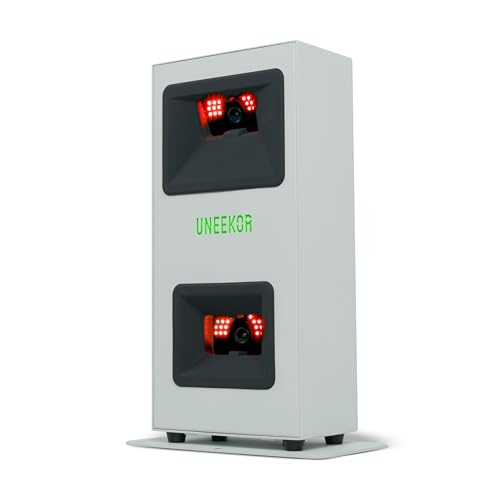
Uneekor EYE MINI CORE Launch Monitor
Best for: data-driven home simulator setups
- Measurement Technology
- High-speed cameras and infrared sensors
- Ball Data Points
- 15
- Color
- White
- Loft
- 15 Degrees
- Launch Monitor Type
- Golf Simulator
- Dimensions
- 6.5 × 3.38 × 13.9 inches
View on Amazon: Uneekor EYE MINI CORE Launch Monitor Affiliate link
The Uneekor EYE MINI CORE uses high-speed cameras and infrared sensors to track 15 ball data points. It features Dimple Optix for reading any golf ball without stickers. The unit measures 6.5 by 3.38 by 13.9 inches and weighs 8.4 pounds. It works with GSPro and includes VIEW software for swing analysis. You need a powerful PC for full simulation.
Pros
- Tracks 15 ball data points for detailed analysis
- Dimple Optix reads any dimple pattern without stickers
- Compatible with third-party software like GSPro
- Compact size fits various home setups
Cons
- Requires a high-end PC with RTX 4070 for simulation
- Club Optix requires a separate software upgrade
- Ultimate Package trial lasts only 3 months
Good fit if
- You want to use any golf ball without stickers
- You already own a powerful gaming PC
- You prefer tracking 15 specific data points
Skip if
- You lack a PC with 32GB RAM and RTX 4070
- You want all features included without extra upgrades
- You need unlimited access to premium courses
Verdict: Uneekor EYE MINI CORE Golf Simulator is a precise tool for data-focused players who have the hardware to support it. It suits those who want sticker-free ball tracking and deep software integration.
Specifications side by side
| Spec | Uneekor EYE MINI CORE Launch Monitor |
|---|---|
| Measurement Technology | High-speed cameras and infrared sensors |
| Ball Data Points | 15 |
| Color | White |
| Loft | 15 Degrees |
| Launch Monitor Type | Golf Simulator |
| Dimensions | 6.5 × 3.38 × 13.9 inches |
| Weight | 8.4 pounds |
Frequently asked questions
Is the Uneekor EYE MINI CORE good for home simulators?
Yes, it is designed for data-driven home simulator setups. The device offers sticker-free ball tracking and deep software integration. This makes it ideal for players who want precise feedback without using physical markers on their equipment. It suits those with the necessary hardware to support its capabilities.
What are the dimensions of the Uneekor EYE MINI CORE?
The unit measures 13.9 inches in height, 6.5 inches in length, and 3.38 inches in width. These compact dimensions allow it to fit easily into various home simulator environments. The white finish helps it blend into standard indoor setups without drawing unnecessary attention.
How heavy is the Uneekor EYE MINI CORE launch monitor?
The launch monitor weighs 8.4 pounds. This weight provides stability during use, ensuring the device remains steady while capturing data. It is substantial enough to stay in place but light enough to move if you need to adjust your simulator layout.
Does the Uneekor EYE MINI CORE require a computer?
Yes, you need a capable PC or laptop to use this launch monitor effectively. The listing specifies distinct hardware requirements for different functions. You will need an Intel Core i5 Gen 12 or AMD Ryzen 5 processor, along with at least 16GB of RAM for the included VIEW software.
What type of launch monitor is the Uneekor EYE MINI CORE?
It is a golf simulator launch monitor. The device uses high-speed cameras and infrared sensors to capture data with near-zero latency. It tracks fifteen distinct metrics for each shot, providing detailed feedback on ball speed, spin, and launch angle to help you tune your swing mechanics.
Who is the Uneekor EYE MINI CORE best for?
It is best for data-focused players who have the hardware to support it. The device is precise and offers sticker-free ball tracking. It is also suitable for those who want deep software integration. If you value detailed metrics and have the necessary computer specs, this tool is a strong fit.